
For tools with multiple symbols, QuoteMedia has added support for an Actions column/feature that adds a column to the right of the table with various “actions” that a user can take.
The QMod tools that support this feature currently include:
QMod Options
QMod PortfolioModule
QMod PortfolioTransactional
QMod EditableWatchlist
QMod Watchlist
Here is an example of what having all of the Actions links activated looks like.
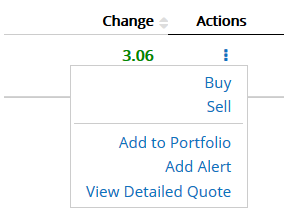
Supported values are:
Buy/Sell = QMod tool sends the user to the page specified in the tradeURL, it includes a snapshot of the latest details for that symbol: Buy or Sell, symbol, exchange, datatype, last price, bidprice, askprice, bidsize, asksize, $chg, %chg, day high/low, volume, datetime. Add pre or post values if it is not in market hours. Parameter for Actions URL = tradeURL
Add to Portfolio = QMod tool sends the user to the page specified to Add to Portfolio and includes the symbol in the row that was clicked. The Portfolio tool has a function to accept the symbol passed to it. Parameter for Actions URL = addToPortfolioURL . The QMod Portfolio tool accepts ?addSymbolToPortfolio={SYMBOL} .
Add to Watchlist = QMod tool sends the user to the page specified to Add to Watchlist and includes the symbol in the row that was clicked. The Watchlist tool has a function to accept the symbol passed to it. Parameter for Actions URL = addToWatchlistURL . The QMod Portfolio tool accepts ?addSymbolToWatchlist={SYMBOL} .
Add Alert = QMod tool sends the user to the page specified to Add Alert and includes the symbol in the row that was clicked. The Alerts tool has a function to accept the symbol passed to it. Parameter for Actions URL = addToAlertsURL . The QMod Alerts tool accepts ?addSymbolToAlerts={SYMBOL} .
View Detailed Quote = Qmod tool send the user to the page specified to View Detailed Quote. Parameter for Actions URL = forwardToDetailedQuoteURL